

MCP servers
An MCP server is a program that offers tools such as create_issue or search over the Model Context Protocol, and a job with the server attached can call them.
You register a server once under MCP Servers and attach it to the jobs that need it.
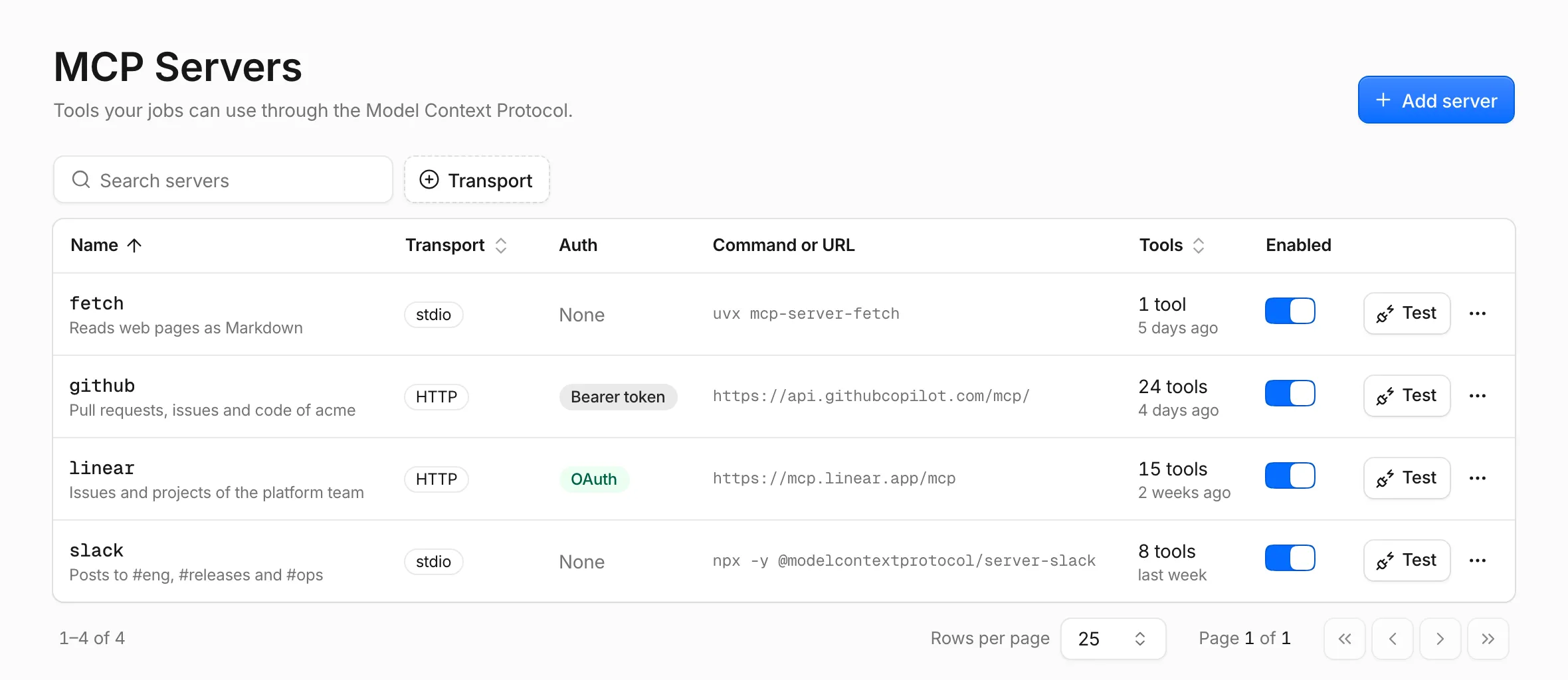
HTTP or stdio
Section titled “HTTP or stdio”An HTTP server runs somewhere else and answers at a URL. Umpteenth connects to it from the host, so header credentials and OAuth tokens never enter the sandbox, and the server works for jobs with No network. It speaks Streamable HTTP and falls back to the older SSE transport for servers that need it.
A stdio server is a command such as npx -y <package> or uvx <package>.
Umpteenth starts it inside each run’s sandbox as a separate user, mcp, so the agent can’t read its environment, and stops it when the run ends.
Pick HTTP if a service offers both, since its credentials then stay on the host. The Introduction shows where each part of a run lives.
Add an HTTP server
Section titled “Add an HTTP server”GitHub hosts an MCP server that accepts a personal access token as a bearer token.
-
Create a secret named
GITHUB_TOKENunder Settings → Secrets that holds a GitHub personal access token. -
Open MCP Servers and click Add server.
-
Enter
githubas the Name, pick HTTP under Transport and set the URL tohttps://api.githubcopilot.com/mcp/. -
Under Headers, add
Authorizationwith the valueBearer {{secret:GITHUB_TOKEN}}. The key button next to a value inserts a secret reference. -
Click Add server. Umpteenth tests the new server and lists its tools.
With an Authorization header, the Auth column shows Bearer token, and Umpteenth doesn’t look for an OAuth login.
Name each server after its service, github rather than gh-final-v2.
The compile step, which turns a new job’s instruction into its settings, matches the services the job needs to your server names, ignoring case.
It can match only servers that exist when you compile, so add servers before you create the jobs that use them.
Add a stdio server
Section titled “Add a stdio server”Brave publishes its search MCP server as an npm package.
-
Create a secret named
BRAVE_API_KEYwith your Brave Search API key. -
Click Add server, enter
braveas the Name and keep stdio under Transport. -
Set the Command to
npxand add the Arguments-yand@brave/brave-search-mcp-server. -
Under Environment, add
BRAVE_API_KEYwith the value{{secret:BRAVE_API_KEY}}. -
Click Add server.
The default sandbox image ships Node, Python and uv, so npx and uvx servers work without a Dockerfile.
If a server fails to start, Umpteenth includes the end of its stderr in the error.
A stdio server runs under the job’s network setting.
npx -y downloads the package each time a run starts, so the job needs Internet access.
For a No network job, install the package in the job’s Dockerfile and start the installed command instead (see Sandboxes).
Umpteenth skips a stdio server that has environment variables in jobs with Run as root, because root could read them. The run’s timeline notes the skip. Use an HTTP server, or install packages with a Dockerfile in place of root.
Test a server
Section titled “Test a server”Click Test in the server’s row or its detail sheet to connect to the server and list its tools. Umpteenth caches the list for the tool picker in job settings, and the Tools column shows the count and the time of the last successful test, or Not tested.
The test dialog shows Connected with the tool list, Login required with a Log in button, or Connection failed after a duration, with the error.
Each tool carries Read-only or Destructive badges when its server marks it that way.
A stdio test can take up to a minute while npx downloads the package, and Umpteenth stops a test after three minutes.
OAuth logins
Section titled “OAuth logins”Some hosted MCP servers use an OAuth login in place of a token.
Umpteenth looks for an OAuth login on an HTTP server without an Authorization header when you add the server or change its URL or headers, and again each time you test a server that has no login.
If a server you add advertises one, Umpteenth sends your browser to the login at once.
For an existing server, click Log in in its row.
At the provider, you approve a client named Umpteenth and land back on MCP Servers with a success toast. The test dialog opens with the tools the login unlocked. The login needs three things:
app.urlin the config file is the URL your browser uses for Umpteenth, because the provider returns to<app.url>/api/mcp-servers/<server id>/oauth/callback.- You’re signed in to Umpteenth in that browser, since an API token can’t start a login.
- You finish at the provider within 10 minutes.
Umpteenth stores the tokens encrypted and never passes them into a sandbox. It refreshes access tokens before they expire, so scheduled runs keep working without you. A login without a refresh token ends when its access token expires.
Auth badges
Section titled “Auth badges”| Badge | Meaning | Action |
|---|---|---|
| OAuth | Logged in | Nothing |
| Not logged in | The server advertises OAuth and has no login, or the provider rejected the refresh token | Log in |
| Login expired | The access token expired and there’s no refresh token | Log in |
| Bearer token | An Authorization header authenticates every request and wins over a login |
Nothing |
| Unknown | Umpteenth couldn’t reach the server to check for OAuth yet | Test |
| None | A stdio server, or an HTTP server without OAuth | Nothing |
Log out, in the row’s menu or the detail sheet, ends a login after a confirmation. Saving a server with a new URL, transport or Client ID ends it too, and so does deleting the server.
OAuth client settings
Section titled “OAuth client settings”Without a Client ID, Umpteenth registers itself with the provider as a client when you log in. Some providers don’t allow that, and the login fails with “the authorization server doesn’t support dynamic client registration, so the server needs an OAuth client ID”. For those, register an OAuth app with the provider yourself:
-
Add the server, then open Edit from its row’s menu and expand OAuth client.
-
Copy the Callback URL into the provider’s app as an allowed redirect URL. The field appears once the server exists.
-
Enter the app’s Client ID. If the app has a client secret, store it under Settings → Secrets and enter a reference such as
{{secret:CLIENT_SECRET}}as the Client secret. Leave the secret empty for a public client. -
Click Save, then Log in.
Fill in Scopes to replace the scopes Umpteenth requests, or leave it empty to request what the server asks for.
Turn a server off
Section titled “Turn a server off”Turn off the Enabled switch in the list to pause a broken server without detaching it from its jobs. The switch saves at once. Umpteenth skips a disabled server in every job, and each job’s MCP servers card marks it Disabled.
Attach servers to a job
Section titled “Attach servers to a job”On the New job review screen, the MCP servers card lists the services the compile step found. A service that matches one of your servers shows Configured and comes pre-ticked under Attach servers, and one without a match shows Not configured.
After you save the job, its Settings tab has an MCP servers card. Add a server with Attach a server…, remove one with its X button, and click Save in the unsaved-changes bar.
Limit the tools
Section titled “Limit the tools”A digest job that reads pull requests has no use for the tool that merges them, so leave that tool off its list. A new attachment allows all of the server’s tools. Once you’ve tested the server, the tools button on the attachment opens a checklist:
- All tools covers tools the server adds later too.
- Untick it and pick the tools the job needs, and the button reads N of M tools.
- Ticking every tool by hand switches back to All tools.
Until you test a server, the row reads “test the server to pick tools” in place of the checklist.
Tools at run time
Section titled “Tools at run time”At the start of each run, Umpteenth connects to every attached, enabled server and gives each two minutes to answer.
A server that fails appears on the timeline as MCP server <name> is unavailable with the reason, and the run goes on without it.
For an expired login, the message reads “The OAuth login expired. Log in again under MCP Servers.”
Umpteenth hands the agent each allowed tool with a readable <server>__<tool> prefix followed by a stable identity suffix.
It replaces characters other than letters, digits, _ and - with _, shortens the readable prefix when needed, and keeps the complete name within 64 characters.
The suffix prevents different raw names from becoming the same function name after replacement or shortening.
Umpteenth counts a tool as read-only if its server marks it so, and treats every other tool as one with side effects.
Read-only calls the agent makes in a row within one turn run in parallel.
Scripts call the same tools with the ump CLI, using the server’s own tool name:
ump mcp tools githubump mcp call github list_pull_requests '{"owner":"acme","repo":"api","state":"open"}'ump mcp call prints the tool’s result and exits with 1 if the tool reports an error.
The timeline records every call the agent makes and a script’s first 1,000 ump calls.
Past those, it keeps recording a script’s calls to tools with side effects until the run has made 200 of them (ump CLI).
If a graduated job’s script fails after tools with side effects ran, the agent that takes over gets a list of those calls so it doesn’t repeat them.
The ump CLI reference has the full syntax.
Servers on your network
Section titled “Servers on your network”Umpteenth connects to HTTP servers at private addresses, such as one on your LAN, unless you set network.allow_private_targets to false in the config file.
With that setting, saving a URL that resolves to a private or local address fails with “points to a private or local network address”, and Umpteenth checks the address again on every connection.
Configuration lists the option.